Troubleshooting: Difference between revisions
From Foenix F256 / Wildbits/K2 Wiki
Jump to navigationJump to search
m (→FNX4N4S issues) |
|||
| (2 intermediate revisions by the same user not shown) | |||
| Line 8: | Line 8: | ||
* '''Can't seem to make the gamepad work reliably, or one button press affects multiple buttons and triggers at once''' | * '''Can't seem to make the gamepad work reliably, or one button press affects multiple buttons and triggers at once''' | ||
* After the first batch of these in 2023, the | * After the first batch of these in 2023, the cable changed to use a different wire color mapping, but were still wired by the same colors inside the FNX4N4S case. If you have a newer unit that matches the original wire color arrangement below, you might need to rewire them to match the later one. Continuity check the DIN9 vs CN1 connections to be sure. | ||
{| class="wikitable" | {| class="wikitable" | ||
|+ | |+@Cibee's wiring solution | ||
!FNX4N4S pins inside, | !FNX4N4S pins inside, | ||
marked CN1 | marked CN1 | ||
| Line 18: | Line 18: | ||
!original 2023 run wire colors | !original 2023 run wire colors | ||
!latest 2024-5 run wire colors | !latest 2024-5 run wire colors | ||
|- | |- | ||
|1 | |1 | ||
| Line 24: | Line 23: | ||
|blue | |blue | ||
|blue | |blue | ||
|- | |- | ||
|2 | |2 | ||
| Line 30: | Line 28: | ||
|red | |red | ||
|red | |red | ||
|- | |- | ||
|3 | |3 | ||
|2 | |2 | ||
|white | |'''white''' | ||
|green | |'''green''' | ||
|- | |- | ||
|4 | |4 | ||
| Line 42: | Line 38: | ||
|brown | |brown | ||
|brown | |brown | ||
|- | |- | ||
|5 | |5 | ||
|3 | |3 | ||
|green | |'''green''' | ||
|orange | |'''orange''' | ||
|- | |- | ||
|6 | |6 | ||
| Line 54: | Line 48: | ||
|purple | |purple | ||
|purple | |purple | ||
|- | |- | ||
|7 | |7 | ||
|4 | |4 | ||
|orange | |'''orange''' | ||
|yellow | |'''yellow''' | ||
|- | |- | ||
|8 | |8 | ||
| Line 66: | Line 58: | ||
|black | |black | ||
|black | |black | ||
|- | |- | ||
|9 | |9 | ||
|5 | |5 | ||
|yellow | |'''yellow''' | ||
|white | |'''white''' | ||
|} | |} | ||
[[File:Fnx4n4s inside.png|thumb|Inside the FNX4N4S adapter box with the top cover removed. CN1 is where the cable is soldered directly on the PCB.]] | [[File:Fnx4n4s inside.png|thumb|Inside the FNX4N4S adapter box with the top cover removed. CN1 is where the cable is soldered directly on the PCB.]] | ||
[[File:Fnx4n4s realcable.png|thumb|Facing the pins of the DIN9 cable of the FNX4N4S adapter box, from the outside.]] | [[File:Fnx4n4s realcable.png|thumb|Facing the pins of the DIN9 cable of the FNX4N4S adapter box, from the outside.]] | ||
* | * | ||
Latest revision as of 06:04, 16 August 2026
TroubleShooting
General issues
- Sometimes, when turning on the F256K/Jr, I get greeted with this screen, from which nothing can happen. How do you resolve this and why does this happen?
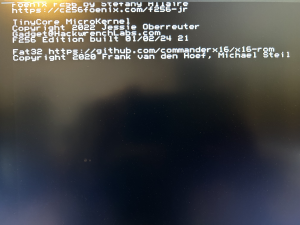
Microkernel boot screen - Every time you are powering off and on your unit, the FPGA needs to reprogram itself and that takes time (i.e. Not Instantaneous). It's possible to have faulty loading because the power supply is not quite stable; the RTC that generates the reset is not aligned with the rest of the system. If you are doing a quick on and off, the capacitors are not empty enough to create a rising power rail so the reset can do its things. Unfortunately those are not ASICs, so nothing is instantaneous.

FNX4N4S issues
- Can't seem to make the gamepad work reliably, or one button press affects multiple buttons and triggers at once
- After the first batch of these in 2023, the cable changed to use a different wire color mapping, but were still wired by the same colors inside the FNX4N4S case. If you have a newer unit that matches the original wire color arrangement below, you might need to rewire them to match the later one. Continuity check the DIN9 vs CN1 connections to be sure.
| FNX4N4S pins inside,
marked CN1 |
DIN9 pins outside the cable,
while facing the pins |
original 2023 run wire colors | latest 2024-5 run wire colors |
|---|---|---|---|
| 1 | 1 | blue | blue |
| 2 | 6 | red | red |
| 3 | 2 | white | green |
| 4 | 7 | brown | brown |
| 5 | 3 | green | orange |
| 6 | 8 | purple | purple |
| 7 | 4 | orange | yellow |
| 8 | 9 | black | black |
| 9 | 5 | yellow | white |


