Troubleshooting
From Foenix F256 / Wildbits/K2 Wiki
General issues
- Sometimes, when turning on the F256K/Jr, I get greeted with this screen, from which nothing can happen. How do you resolve this and why does this happen?
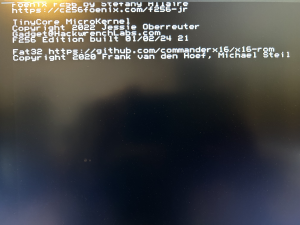
Microkernel boot screen - Every time you are powering off and on your unit, the FPGA needs to reprogram itself and that takes time (i.e. Not Instantaneous). It's possible to have faulty loading because the power supply is not quite stable; the RTC that generates the reset is not aligned with the rest of the system. If you are doing a quick on and off, the capacitors are not empty enough to create a rising power rail so the reset can do its things. Unfortunately those are not ASICs, so nothing is instantaneous.

FNX4N4S issues
- Can't seem to make the gamepad work reliably, or one button press affects multiple buttons and triggers at once
- After the first batch of these in 2023, the cabling changed and the differing wire colors induced some errors in the wiring inside the FNX4N4S case. The solution is to follow @Cibee's work and make sure you tie these 2 sets of pins the right way:
| FNX4N4S pins inside,
marked CN1 |
DIN9 pins outside the cable,
while facing the pins |
original 2023 run wire colors | latest 2024-5 run wire colors |
|---|---|---|---|
| 1 | 1 | blue | blue |
| 2 | 6 | red | red |
| 3 | 2 | white | green |
| 4 | 7 | brown | brown |
| 5 | 3 | green | orange |
| 6 | 8 | purple | purple |
| 7 | 4 | orange | yellow |
| 8 | 9 | black | black |
| 9 | 5 | yellow | white |


